> ## Documentation Index
> Fetch the complete documentation index at: https://developers.referly.so/llms.txt
> Use this file to discover all available pages before exploring further.
# Introduction
> Referly is an Affiliate Marketing Software and Network that lets you easily Track, Manage and Partner with Affiliates. This is the Custom API documentation that details how to use the API to track payments and attribute proper commissions.
 The API is a premium feature that's only available to users who have an active
Business Plan. [See Pricing Page](https://referly.so/pricing)
## Welcome
To be able to use this API, you need to have created your Affiliate Program and entered all necessary details.
Create your Affiliate Program and integrate the tracking code to your website.
## Authentication
All API endpoints are authenticated using Bearer tokens, this requires you to have completed creating your Affiliate Program. Here's how you create an Auth Token:
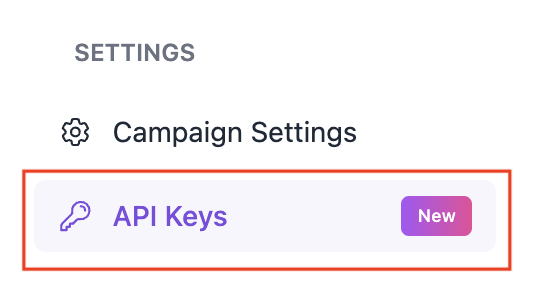
Step 1. Click on `API Keys` on your dashboard sidebar:
The API is a premium feature that's only available to users who have an active
Business Plan. [See Pricing Page](https://referly.so/pricing)
## Welcome
To be able to use this API, you need to have created your Affiliate Program and entered all necessary details.
Create your Affiliate Program and integrate the tracking code to your website.
## Authentication
All API endpoints are authenticated using Bearer tokens, this requires you to have completed creating your Affiliate Program. Here's how you create an Auth Token:
Step 1. Click on `API Keys` on your dashboard sidebar:
 Step 2. Click on `Generate New API Key +`:
 Step 3. Click the copy icon to copy your Auth Token:
 Step 4. Add your Auth Token to your API requests:
```json theme={null}
{
"Authorization": "Bearer "
}
```
## Understanding Coupons & Promotional Codes
The API includes powerful coupon and promotional code management features. Here's how they work together:
### Coupons: The Discount Definition
**Coupons** define the structure and rules for discounts in your affiliate program. Think of them as templates that specify:
* **Discount Type**: Percentage (e.g., 20% off) or Flat amount (e.g., \$10 off)
* **Discount Value**: The actual amount or percentage
* **Duration**: One-time use, forever, or repeating for X months
* **Restrictions**: Product limits, expiration dates, maximum redemptions
### Promotional Codes: The Customer-Facing Codes
**Promotional codes** are the actual discount codes that customers enter at checkout. They are linked to coupons and inherit their discount properties.
Key characteristics:
* Each promotional code is associated with one coupon
* Multiple promotional codes can share the same coupon (same discount, different codes)
* Promotional codes can be assigned to specific affiliates for tracking
* Codes can be manually created or auto-generated based on customizable structures
### Example Workflow
1. **Create a Coupon**: Define a 20% discount that lasts for 3 months
2. **Generate Promotional Codes**: Create codes like "JOHN20", "SARAH20", "MIKE20" that all use the same 20% discount
3. **Assign to Affiliates**: Each code is assigned to a different affiliate for tracking
4. **Track Performance**: Monitor which codes are used and attribute sales to the correct affiliates
This two-tier system gives you flexibility to:
* Maintain consistent discount structures across multiple affiliates
* Generate unique codes for each affiliate while keeping the same discount terms
* Update discount terms for all codes by modifying the parent coupon
* Track performance at both the coupon level (overall discount performance) and code level (individual affiliate performance)
Step 4. Add your Auth Token to your API requests:
```json theme={null}
{
"Authorization": "Bearer "
}
```
## Understanding Coupons & Promotional Codes
The API includes powerful coupon and promotional code management features. Here's how they work together:
### Coupons: The Discount Definition
**Coupons** define the structure and rules for discounts in your affiliate program. Think of them as templates that specify:
* **Discount Type**: Percentage (e.g., 20% off) or Flat amount (e.g., \$10 off)
* **Discount Value**: The actual amount or percentage
* **Duration**: One-time use, forever, or repeating for X months
* **Restrictions**: Product limits, expiration dates, maximum redemptions
### Promotional Codes: The Customer-Facing Codes
**Promotional codes** are the actual discount codes that customers enter at checkout. They are linked to coupons and inherit their discount properties.
Key characteristics:
* Each promotional code is associated with one coupon
* Multiple promotional codes can share the same coupon (same discount, different codes)
* Promotional codes can be assigned to specific affiliates for tracking
* Codes can be manually created or auto-generated based on customizable structures
### Example Workflow
1. **Create a Coupon**: Define a 20% discount that lasts for 3 months
2. **Generate Promotional Codes**: Create codes like "JOHN20", "SARAH20", "MIKE20" that all use the same 20% discount
3. **Assign to Affiliates**: Each code is assigned to a different affiliate for tracking
4. **Track Performance**: Monitor which codes are used and attribute sales to the correct affiliates
This two-tier system gives you flexibility to:
* Maintain consistent discount structures across multiple affiliates
* Generate unique codes for each affiliate while keeping the same discount terms
* Update discount terms for all codes by modifying the parent coupon
* Track performance at both the coupon level (overall discount performance) and code level (individual affiliate performance)